
来源、许可与阅读说明
- 简体中文原文:translations/zh-CN/06-text-generation-apps/README.md
- 来源:microsoft/generative-ai-for-beginners;固定提交:645f932514e9
- 版权与贡献:Copyright (c) Microsoft Corporation;课程内容及简体中文翻译由固定版本记录的项目贡献者共同维护。
- 许可:MIT License 固定版本;完整许可文本保留在本文末尾。
- 本站适配:选取仓库已有的简体中文课程,移除翻译元数据,固定图片与仓库文件链接,并把跨课链接改为站内连续阅读;不把代码示例和作业 Notebook 重复复制为文章。
- 非官方说明:本站只做独立的公开学习编排,不代表 Microsoft、课程维护者或文中第三方对本站的合作、认证或背书。
- 时效与安全:模型、API、价格、平台和命令可能变化;运行示例前请核对固定源码与最新官方文档,密钥只能放在受控环境变量中。
- 授权、更正或删除请求请通过本站首页公开联系方式提出,收到有效请求后先下架再核查。
构建文本生成应用
(点击上方图片查看本课视频)
你已经在本课程中看到,核心概念如提示词,甚至还有一个完整的学科叫“提示词工程”。许多工具如 ChatGPT、Office 365、Microsoft Power Platform 等,都支持你使用提示词来完成某些任务。
如果你想给应用添加这样的体验,你需要理解提示词、完成等概念,并选择一个库来使用。这正是你将在本章中学习的内容。
介绍
在本章中,你将:
- 了解 openai 库及其核心概念。
- 使用 openai 构建一个文本生成应用。
- 理解如何使用提示词、温度和令牌等概念来构建文本生成应用。
学习目标
本课结束时,你将能够:
- 解释什么是文本生成应用。
- 使用 openai 构建文本生成应用。
- 配置你的应用以使用更多或更少的令牌,并且调整温度,以获得多样化的输出。
什么是文本生成应用?
通常当你构建一个应用时,它有某种界面,比如:
- 基于命令的。控制台应用是典型的应用,你输入命令,它执行任务。例如,
git是一个基于命令的应用。 - 用户界面(UI)。有些应用具有图形用户界面(GUI),你可以点击按钮、输入文本、选择选项等。
控制台和 UI 应用的限制
与基于命令的应用对比,你输入命令:
- 受限。你不能随意输入任何命令,只能输入应用支持的命令。
- 语言特定。有些应用支持多种语言,但默认情况下应用是为特定语言构建的,虽然可以添加更多语言支持。
文本生成应用的优势
那么,文本生成应用有何不同?
在文本生成应用中,你有更多灵活性,不受限于一组固定命令或特定输入语言。你可以使用自然语言与应用交互。另一好处是,你实际上是在使用一个经过大量语料训练的数据源,而传统应用可能仅限于数据库中的内容。
用文本生成应用能创建什么?
你可以构建很多东西,例如:
- 聊天机器人。一个关于某些主题(如你的公司及产品)回答问题的聊天机器人会很适合。
- 辅助工具。大语言模型(LLM)擅长诸如摘要文本、获取文本洞见、生成简历等文本生成任务。
- 代码助手。根据你使用的语言模型,你可以构建帮助写代码的助手。例如,你可以使用 GitHub Copilot 或 ChatGPT 来辅助编码。
如何开始?
你需要找到一种方法集成大语言模型(LLM),通常有以下两种方式:
- 使用 API。构造包含你的提示词的网络请求,然后获取生成的文本。
- 使用库。库帮助封装 API 调用,使其更易用。
库/SDK
有几款知名的大语言模型库,如:
- openai,该库让连接你的模型并发送提示词变得简单。
还有一些更高级别的库,例如:
- Langchain。Langchain 是知名库,支持 Python。
- Semantic Kernel。Semantic Kernel 是微软的库,支持 C#、Python 和 Java。
使用 openai 构建第一个应用
让我们看看如何构建第一个应用,需要的库,及其量级等。
安装 openai
现有很多库可用于与 OpenAI 或 Azure OpenAI 交互,支持多种编程语言,如 C#、Python、JavaScript、Java 等。我们选择使用 openai Python 库,用 pip 安装它。
pip install openai
创建资源
你需要执行以下步骤:
-
在 Azure 创建账户 https://azure.microsoft.com/free/。
-
获取 Azure OpenAI 访问权限。访问 https://learn.microsoft.com/azure/ai-services/openai/overview#how-do-i-get-access-to-azure-openai 并申请权限。
[!NOTE] 撰写本文时,你需要申请访问 Azure OpenAI。
-
安装 Python https://www.python.org/
-
已创建 Azure OpenAI 服务资源。详见本指南如何创建资源。
查找 API 密钥和端点
此时,你需要告诉 openai 库使用哪个 API 密钥。进入 Azure OpenAI 资源的“密钥和端点”部分,复制 “密钥 1” 的值。
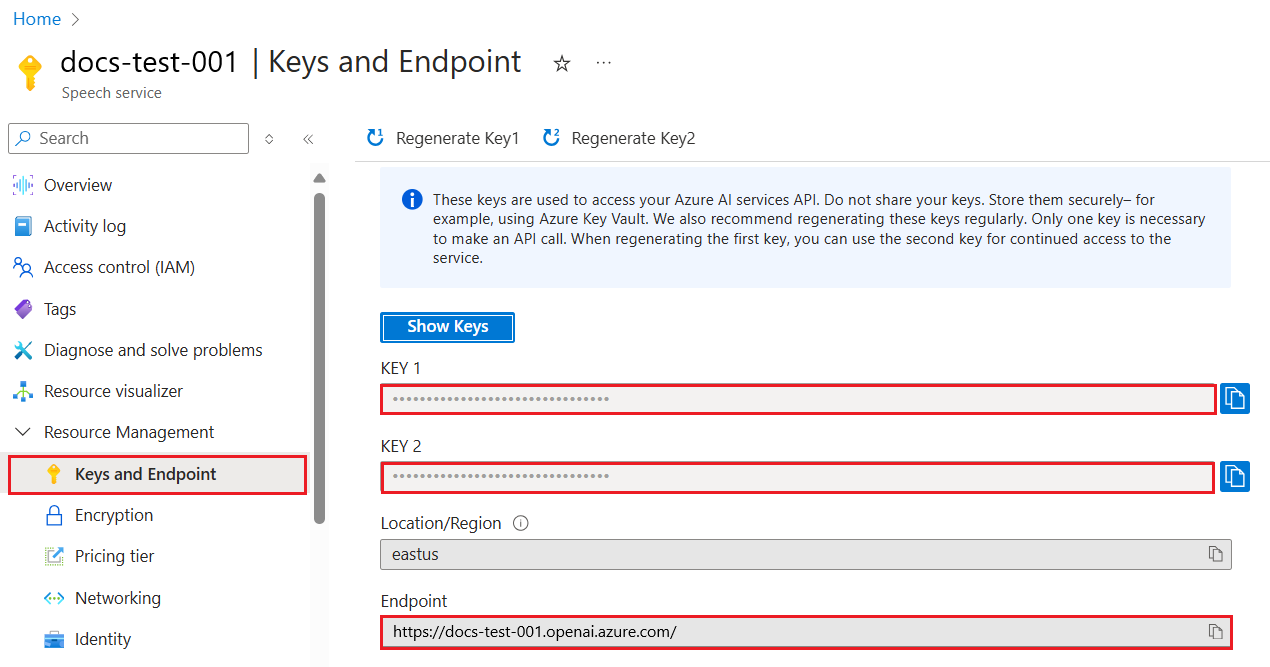
复制这些信息后,让我们告诉库如何使用它们。
[!NOTE] 最好将你的 API 密钥与代码分开。可以通过环境变量实现。
- 将环境变量
OPENAI_API_KEY设置为你的 API 密钥。export OPENAI_API_KEY='sk-...'
配置 Azure
如果你使用 Azure OpenAI(现为 Microsoft Foundry 一部分),配置方法如下。我们使用标准的 OpenAI 客户端,指向 Azure OpenAI 的 /openai/v1/ 端点,支持响应 API,无需 api_version 参数:
import os
from openai import OpenAI

client = OpenAI(
    api_key=os.environ["AZURE_OPENAI_API_KEY"],
    base_url=f"{os.environ['AZURE_OPENAI_ENDPOINT'].rstrip('/')}/openai/v1/",
)
上面设置了:
api_key,即你从 Azure 门户或 Microsoft Foundry 门户获得的 API 密钥。base_url,即你的 Foundry 资源端点,后面带/openai/v1/。稳定的 v1 端点适用于 OpenAI 和 Azure OpenAI,无需管理api_version。
[!NOTE] >
os.environ读取环境变量。你可以用它读取如AZURE_OPENAI_API_KEY和AZURE_OPENAI_ENDPOINT的环境变量。可在终端设置这些变量,或者使用dotenv等库。
生成文本
生成文本的方法是使用响应 API 的 responses.create 方法,示例如下:
prompt = "Complete the following: Once upon a time there was a"

response = client.responses.create(
    model="gpt-4o-mini",  # 这是您的模型部署名称
    input=prompt,
    store=False,
)
print(response.output_text)
上面代码中,我们创建了一个响应,传入了模型和提示词。然后通过 response.output_text 打印生成的文本。
多轮对话
响应 API 很适合单轮文本生成与多轮聊天机器人 - 你通过 input 提供消息列表,逐步构建对话:
from openai import OpenAI

client = OpenAI(api_key="sk-...")

response = client.responses.create(model="gpt-4o-mini", input="Hello world", store=False)
print(response.output_text)
关于这一功能的更多内容将出现在后续章节。
练习 - 你的第一个文本生成应用
了解如何设置并配置 openai 后,现在开始构建第一个文本生成应用。步骤如下:
-
创建虚拟环境并安装 openai:
BASHpython -m venv venv source venv/bin/activate pip install openai[!NOTE] 如果你使用 Windows,输入
venv\Scripts\activate替代source venv/bin/activate。[!NOTE] 在 https://portal.azure.com/ 查找 Azure OpenAI 密钥,搜索
Open AI,选择Open AI 资源,然后选择密钥和端点,复制Key 1的值。 -
创建一个 app.py 文件,并写入以下代码:
PYTHONimport os from openai import OpenAI client = OpenAI( api_key="<replace this value with your Azure OpenAI key>", base_url="<endpoint found in Azure Portal>/openai/v1/", ) deployment_name = "<deployment name>" # 添加您的完成代码 prompt = "Complete the following: Once upon a time there was a" # 使用 Responses API 进行请求 response = client.responses.create(model=deployment_name, input=prompt, store=False) # 打印响应 print(response.output_text)[!NOTE] 如果使用纯 OpenAI(非 Azure),请使用
client = OpenAI(api_key="<将此处替换成你的 OpenAI 密钥>")(无base_url),传入模型名称如gpt-4o-mini而非部署名。你应该看到如下输出:
OUTPUTvery unhappy _____. Once upon a time there was a very unhappy mermaid.
不同类型的提示词,用于不同任务
你已经看到如何使用提示词生成文本。你甚至有一个运行中的程序,可以修改并生成不同类型的文本。
提示词可用于各种任务。例如:
- 生成某种文本。如生成诗歌、测验题目等。
- 查询信息。用提示词查询信息,如示例“网页开发中 CORS 是什么?”。
- 生成代码。用提示词生成代码,例如正则表达式来验证邮件,甚至生成一个完整程序如网页应用。
更实用的案例:食谱生成器
想象你家里有一些食材,想做菜。这时需要食谱。一种寻找食谱的方法是用搜索引擎,另一种是用大语言模型(LLM)。
你可以写如下提示词:
“给我展示5个包含以下食材的菜谱:鸡肉、土豆和胡萝卜。每个菜谱列出所有使用的食材”
根据上述提示词,你可能得到类似响应:
1. Roasted Chicken and Vegetables:
Ingredients:
- 4 chicken thighs
- 2 potatoes, cut into cubes
- 2 carrots, cut into cubes
- 2 tablespoons olive oil
- 2 cloves garlic, minced
- 1 teaspoon dried thyme
- 1 teaspoon dried oregano
- Salt and pepper, to taste

2. Chicken and Potato Stew:
Ingredients:
- 2 tablespoons olive oil
- 1 onion, diced
- 2 cloves garlic, minced
- 2 chicken breasts, cut into cubes
- 2 potatoes, cut into cubes
- 2 carrots, cut into cubes
- 1 teaspoon dried oregano
- 1 teaspoon dried thyme
- 1 cup chicken broth
- Salt and pepper, to taste

3. Chicken and Potato Bake:
Ingredients:
- 2 tablespoons olive oil
- 2 chicken breasts, cut into cubes
- 2 potatoes, cut into cubes
- 2 carrots, cut into cubes
- 1 onion, diced
- 2 cloves garlic, minced
- 1 teaspoon dried oregano
- 1 teaspoon dried thyme
- 1 cup chicken broth
- Salt and pepper, to taste

4. Chicken and Potato Soup:
Ingredients:
- 2 tablespoons olive oil
- 1 onion, diced
- 2 cloves garlic, minced
- 2 chicken breasts, cut into cubes
- 2 potatoes, cut into cubes
- 2 carrots, cut into cubes
- 1 teaspoon dried oregano
- 1 teaspoon dried thyme
- 4 cups chicken broth
- Salt and pepper, to taste

5. Chicken and Potato Hash:
Ingredients:
- 2 tablespoons olive oil
- 2 chicken breasts, cut into cubes
- 2 potatoes, cut into cubes
- 2 carrots, cut into cubes
- 1 onion, diced
- 2 cloves garlic, minced
- 1 teaspoon dried oregano
这个结果不错,我知道该做什么了。此时,有用的改进可能是:
- 过滤掉我不喜欢或过敏的食材。
- 生成购物清单,以防我家里没有所有食材。
针对上述情况,我们添加一个额外的提示词:
“请移除含大蒜的菜谱,因为我过敏,并用其它食材代替。还请生成这些菜谱的购物清单,考虑到我家已有鸡肉、土豆和胡萝卜。”
现在你会得到新的结果,即:
1. Roasted Chicken and Vegetables:
Ingredients:
- 4 chicken thighs
- 2 potatoes, cut into cubes
- 2 carrots, cut into cubes
- 2 tablespoons olive oil
- 1 teaspoon dried thyme
- 1 teaspoon dried oregano
- Salt and pepper, to taste

2. Chicken and Potato Stew:
Ingredients:
- 2 tablespoons olive oil
- 1 onion, diced
- 2 chicken breasts, cut into cubes
- 2 potatoes, cut into cubes
- 2 carrots, cut into cubes
- 1 teaspoon dried oregano
- 1 teaspoon dried thyme
- 1 cup chicken broth
- Salt and pepper, to taste

3. Chicken and Potato Bake:
Ingredients:
- 2 tablespoons olive oil
- 2 chicken breasts, cut into cubes
- 2 potatoes, cut into cubes
- 2 carrots, cut into cubes
- 1 onion, diced
- 1 teaspoon dried oregano
- 1 teaspoon dried thyme
- 1 cup chicken broth
- Salt and pepper, to taste

4. Chicken and Potato Soup:
Ingredients:
- 2 tablespoons olive oil
- 1 onion, diced
- 2 chicken breasts, cut into cubes
- 2 potatoes, cut into cubes
- 2 carrots, cut into cubes
- 1 teaspoon dried oregano
- 1 teaspoon dried thyme
- 4 cups chicken broth
- Salt and pepper, to taste

5. Chicken and Potato Hash:
Ingredients:
- 2 tablespoons olive oil
- 2 chicken breasts, cut into cubes
- 2 potatoes, cut into cubes
- 2 carrots, cut into cubes
- 1 onion, diced
- 1 teaspoon dried oregano

Shopping List:
- Olive oil
- Onion
- Thyme
- Oregano
- Salt
- Pepper
这就是你的五个菜谱,没有大蒜,并且根据你已有的食材生成了购物清单。
练习 - 构建食谱生成器
既然演示了一个场景,我们来写代码匹配该场景。步骤如下:
-
使用已有的 app.py 文件作为起点
-
查找
prompt变量并将其代码改成如下:PYTHONprompt = "Show me 5 recipes for a dish with the following ingredients: chicken, potatoes, and carrots. Per recipe, list all the ingredients used"如果现在运行代码,你会看到类似输出:
OUTPUT-Chicken Stew with Potatoes and Carrots: 3 tablespoons oil, 1 onion, chopped, 2 cloves garlic, minced, 1 carrot, peeled and chopped, 1 potato, peeled and chopped, 1 bay leaf, 1 thyme sprig, 1/2 teaspoon salt, 1/4 teaspoon black pepper, 1 1/2 cups chicken broth, 1/2 cup dry white wine, 2 tablespoons chopped fresh parsley, 2 tablespoons unsalted butter, 1 1/2 pounds boneless, skinless chicken thighs, cut into 1-inch pieces -Oven-Roasted Chicken with Potatoes and Carrots: 3 tablespoons extra-virgin olive oil, 1 tablespoon Dijon mustard, 1 tablespoon chopped fresh rosemary, 1 tablespoon chopped fresh thyme, 4 cloves garlic, minced, 1 1/2 pounds small red potatoes, quartered, 1 1/2 pounds carrots, quartered lengthwise, 1/2 teaspoon salt, 1/4 teaspoon black pepper, 1 (4-pound) whole chicken -Chicken, Potato, and Carrot Casserole: cooking spray, 1 large onion, chopped, 2 cloves garlic, minced, 1 carrot, peeled and shredded, 1 potato, peeled and shredded, 1/2 teaspoon dried thyme leaves, 1/4 teaspoon salt, 1/4 teaspoon black pepper, 2 cups fat-free, low-sodium chicken broth, 1 cup frozen peas, 1/4 cup all-purpose flour, 1 cup 2% reduced-fat milk, 1/4 cup grated Parmesan cheese -One Pot Chicken and Potato Dinner: 2 tablespoons olive oil, 1 pound boneless, skinless chicken thighs, cut into 1-inch pieces, 1 large onion, chopped, 3 cloves garlic, minced, 1 carrot, peeled and chopped, 1 potato, peeled and chopped, 1 bay leaf, 1 thyme sprig, 1/2 teaspoon salt, 1/4 teaspoon black pepper, 2 cups chicken broth, 1/2 cup dry white wine -Chicken, Potato, and Carrot Curry: 1 tablespoon vegetable oil, 1 large onion, chopped, 2 cloves garlic, minced, 1 carrot, peeled and chopped, 1 potato, peeled and chopped, 1 teaspoon ground coriander, 1 teaspoon ground cumin, 1/2 teaspoon ground turmeric, 1/2 teaspoon ground ginger, 1/4 teaspoon cayenne pepper, 2 cups chicken broth, 1/2 cup dry white wine, 1 (15-ounce) can chickpeas, drained and rinsed, 1/2 cup raisins, 1/2 cup chopped fresh cilantro注意,你的 LLM 是非确定性的,所以每次运行结果可能不同。
很好,我们来看如何改进。为了提高灵活性,使食材和菜谱数量都能改动,我们做如下修改。
-
修改代码如下:
PYTHONno_recipes = input("No of recipes (for example, 5): ") ingredients = input("List of ingredients (for example, chicken, potatoes, and carrots): ") # 将配方数量插入提示和配料中 prompt = f"Show me {no_recipes} recipes for a dish with the following ingredients: {ingredients}. Per recipe, list all the ingredients used"这个测试代码运行示例如下:
OUTPUTNo of recipes (for example, 5): 3 List of ingredients (for example, chicken, potatoes, and carrots): milk,strawberries -Strawberry milk shake: milk, strawberries, sugar, vanilla extract, ice cubes -Strawberry shortcake: milk, flour, baking powder, sugar, salt, unsalted butter, strawberries, whipped cream -Strawberry milk: milk, strawberries, sugar, vanilla extract
通过添加过滤和购物清单改进
我们现在有一个能生成食谱的应用,且非常灵活,因其依赖用户输入的食谱数量和使用的食材。
进一步改进,我们想添加:
-
过滤食材。我们想过滤掉不喜欢或过敏的食材。为此,我们可以编辑现有提示词,在末尾添加过滤条件,如下所示:
PYTHONfilter = input("Filter (for example, vegetarian, vegan, or gluten-free): ") prompt = f"Show me {no_recipes} recipes for a dish with the following ingredients: {ingredients}. Per recipe, list all the ingredients used, no {filter}"上面,我们在提示词末尾添加了
{filter},并从用户那获取了过滤值。运行程序的输入示例现在可如下:
OUTPUTNo of recipes (for example, 5): 3 List of ingredients (for example, chicken, potatoes, and carrots): onion,milk Filter (for example, vegetarian, vegan, or gluten-free): no milk 1. French Onion Soup Ingredients: -1 large onion, sliced -3 cups beef broth -1 cup milk -6 slices french bread -1/4 cup shredded Parmesan cheese -1 tablespoon butter -1 teaspoon dried thyme -1/4 teaspoon salt -1/4 teaspoon black pepper Instructions: 1. In a large pot, sauté onions in butter until golden brown. 2. Add beef broth, milk, thyme, salt, and pepper. Bring to a boil. 3. Reduce heat and simmer for 10 minutes. 4. Place french bread slices on soup bowls. 5. Ladle soup over bread. 6. Sprinkle with Parmesan cheese. 2. Onion and Potato Soup Ingredients: -1 large onion, chopped -2 cups potatoes, diced -3 cups vegetable broth -1 cup milk -1/4 teaspoon black pepper Instructions: 1. In a large pot, sauté onions in butter until golden brown. 2. Add potatoes, vegetable broth, milk, and pepper. Bring to a boil. 3. Reduce heat and simmer for 10 minutes. 4. Serve hot. 3. Creamy Onion Soup Ingredients: -1 large onion, chopped -3 cups vegetable broth -1 cup milk -1/4 teaspoon black pepper -1/4 cup all-purpose flour -1/2 cup shredded Parmesan cheese Instructions: 1. In a large pot, sauté onions in butter until golden brown. 2. Add vegetable broth, milk, and pepper. Bring to a boil. 3. Reduce heat and simmer for 10 minutes. 4. In a small bowl, whisk together flour and Parmesan cheese until smooth. 5. Add to soup and simmer for an additional 5 minutes, or until soup has thickened.如你所见,任何含有牛奶的菜谱都被过滤掉了。但如果你乳糖不耐症,可能还想过滤含有奶酪的菜谱,所以需要明确说明。
-
生成购物清单。我们想生成一份购物清单,同时考虑我们家里已有的物品。
对于这个功能,我们可以尝试在一个提示中解决所有问题,或者将其拆分为两个提示。让我们尝试后一种方法。这里我们建议添加一个额外的提示,但为了让它工作,我们需要将前一个提示的结果作为上下文添加到后一个提示中。
找到代码中打印第一个提示结果的部分,并在下面添加如下代码:
PYTHONold_prompt_result = response.output_text prompt = "Produce a shopping list for the generated recipes and please don't include ingredients that I already have." new_prompt = f"{old_prompt_result} {prompt}" response = client.responses.create(model=deployment_name, input=new_prompt, max_output_tokens=1200, store=False) # 打印响应 print("Shopping list:") print(response.output_text)注意以下几点:
-
我们通过将第一个提示的结果添加到新提示,构造了一个新的提示:
PYTHONnew_prompt = f"{old_prompt_result} {prompt}" -
我们发起了一个新的请求,同时考虑了第一个提示中请求的tokens数量,因此这次将
max_output_tokens设置为1200。PYTHONresponse = client.responses.create(model=deployment_name, input=new_prompt, max_output_tokens=1200, store=False)运用这段代码后,我们得到了如下输出:
OUTPUTNo of recipes (for example, 5): 2 List of ingredients (for example, chicken, potatoes, and carrots): apple,flour Filter (for example, vegetarian, vegan, or gluten-free): sugar -Apple and flour pancakes: 1 cup flour, 1/2 tsp baking powder, 1/2 tsp baking soda, 1/4 tsp salt, 1 tbsp sugar, 1 egg, 1 cup buttermilk or sour milk, 1/4 cup melted butter, 1 Granny Smith apple, peeled and grated -Apple fritters: 1-1/2 cups flour, 1 tsp baking powder, 1/4 tsp salt, 1/4 tsp baking soda, 1/4 tsp nutmeg, 1/4 tsp cinnamon, 1/4 tsp allspice, 1/4 cup sugar, 1/4 cup vegetable shortening, 1/4 cup milk, 1 egg, 2 cups shredded, peeled apples Shopping list: -Flour, baking powder, baking soda, salt, sugar, egg, buttermilk, butter, apple, nutmeg, cinnamon, allspice
-
改进你的设置
到目前为止,我们有了一份可运行的代码,但仍有一些调整可以进一步改进。我们应该做的一些事情包括:
-
将密钥与代码分离,例如API密钥。密钥不应出现在代码中,应存储在安全的位置。为了将密钥与代码分离,我们可以使用环境变量和像
python-dotenv这样的库从文件中加载它们。代码示例如下:-
创建一个内容如下的
.env文件:BASHOPENAI_API_KEY=sk-...注意,对于Microsoft Foundry中的Azure OpenAI,需要设置以下环境变量:
BASHAZURE_OPENAI_API_KEY=<replace> AZURE_OPENAI_ENDPOINT=<replace> AZURE_OPENAI_API_VERSION=2024-10-21在代码中,将按如下方式加载环境变量:
PYTHONimport os from dotenv import load_dotenv from openai import OpenAI load_dotenv() client = OpenAI(api_key=os.environ["OPENAI_API_KEY"])
-
-
关于token长度的一点说明。我们应该考虑生成所需文本需要多少tokens。tokens是有成本的,因此在可能的情况下,我们应尽量节省tokens的使用量。例如,我们能否调整提示语,从而减少tokens用量?
你可以通过
max_output_tokens参数更改tokens的使用数量。例如,如果想使用100个tokens,可以这样设置:PYTHONresponse = client.responses.create(model=deployment, input=prompt, max_output_tokens=100, store=False) -
尝试调整temperature参数。temperature是我们之前没有提到过但对程序表现非常重要的参数。temperature数值越高,输出越随机;相反,temperature数值越低,输出越可预测。请根据是否需要输出多样性来决定。
你可以通过
temperature参数调整temperature值。例如,想设置temperature为0.5,可以这样做:PYTHONresponse = client.responses.create(model=deployment, input=prompt, temperature=0.5, store=False)注意,越接近1.0,输出越多变。
任务
这个任务由你自由选择想要构建的内容。
下面是一些建议:
- 调整食谱生成器应用,进一步改进它。尝试不同的temperature值和提示语,看看能得到什么效果。
- 构建一个“学习伴侣”。这个应用能够回答关于某个主题(例如Python)的问题,你可以使用类似“Python中某个主题是什么?”的提示,或者“展示某个主题的代码”等提示。
- 历史机器人,让历史栩栩如生,指示机器人扮演某个历史人物,并提问关于其生平和时代的问题。
解决方案
学习伴侣
下面是一个入门提示,看看你如何使用和调整它以满足你的需求。
- "You're an expert on the Python language

    Suggest a beginner lesson for Python in the following format:

    Format:
    - concepts:
    - brief explanation of the lesson:
    - exercise in code with solutions"
历史机器人
这里有一些你可以使用的提示:
- "You are Abe Lincoln, tell me about yourself in 3 sentences, and respond using grammar and words like Abe would have used"
- "You are Abe Lincoln, respond using grammar and words like Abe would have used:

   Tell me about your greatest accomplishments, in 300 words"
知识检测
temperature参数的作用是什么?
- 它控制输出的随机程度。
- 它控制响应的大小。
- 它控制使用多少tokens。
🚀 挑战
在完成任务时,尝试调整temperature参数,分别设置为0、0.5和1。记住0是最不多变的,1是变化最多的。哪个值对你的应用最适合?
做得好!继续学习
完成本课后,浏览我们的生成式AI学习合集,继续提升你的生成式AI知识!
赶快前往第7课,我们将探讨如何构建聊天应用!
免责声明: 本文件由 AI 翻译服务 Co-op Translator 翻译完成。尽管我们力求准确,但请注意,自动翻译可能包含错误或不准确之处。原始语言版文件应视为权威来源。对于重要信息,建议使用专业人工翻译。我们对因使用本翻译而产生的任何误解或误释不承担责任。
MIT License
MIT License

Copyright (c) Microsoft Corporation.

Permission is hereby granted, free of charge, to any person obtaining a copy
of this software and associated documentation files (the "Software"), to deal
in the Software without restriction, including without limitation the rights
to use, copy, modify, merge, publish, distribute, sublicense, and/or sell
copies of the Software, and to permit persons to whom the Software is
furnished to do so, subject to the following conditions:

The above copyright notice and this permission notice shall be included in all
copies or substantial portions of the Software.

THE SOFTWARE IS PROVIDED "AS IS", WITHOUT WARRANTY OF ANY KIND, EXPRESS OR
IMPLIED, INCLUDING BUT NOT LIMITED TO THE WARRANTIES OF MERCHANTABILITY,
FITNESS FOR A PARTICULAR PURPOSE AND NONINFRINGEMENT. IN NO EVENT SHALL THE
AUTHORS OR COPYRIGHT HOLDERS BE LIABLE FOR ANY CLAIM, DAMAGES OR OTHER
LIABILITY, WHETHER IN AN ACTION OF CONTRACT, TORT OR OTHERWISE, ARISING FROM,
OUT OF OR IN CONNECTION WITH THE SOFTWARE OR THE USE OR OTHER DEALINGS IN THE
SOFTWARE.