
来源、许可与阅读说明
- 简体中文原文:translations/zh-CN/11-integrating-with-function-calling/README.md
- 来源:microsoft/generative-ai-for-beginners;固定提交:645f932514e9
- 版权与贡献:Copyright (c) Microsoft Corporation;课程内容及简体中文翻译由固定版本记录的项目贡献者共同维护。
- 许可:MIT License 固定版本;完整许可文本保留在本文末尾。
- 本站适配:选取仓库已有的简体中文课程,移除翻译元数据,固定图片与仓库文件链接,并把跨课链接改为站内连续阅读;不把代码示例和作业 Notebook 重复复制为文章。
- 非官方说明:本站只做独立的公开学习编排,不代表 Microsoft、课程维护者或文中第三方对本站的合作、认证或背书。
- 时效与安全:模型、API、价格、平台和命令可能变化;运行示例前请核对固定源码与最新官方文档,密钥只能放在受控环境变量中。
- 授权、更正或删除请求请通过本站首页公开联系方式提出,收到有效请求后先下架再核查。
集成函数调用
到目前为止,你已经在之前的课程中学到了不少内容。然而,我们还可以进一步改进。一些我们可以解决的问题包括如何获得更一致的响应格式,以便更方便地在后续处理响应。此外,我们可能还想添加来自其他来源的数据,以进一步丰富我们的应用程序。
上述问题就是本章要解决的内容。
介绍
本课将涵盖:
- 解释什么是函数调用及其使用场景。
- 使用 Azure OpenAI 创建函数调用。
- 如何将函数调用集成到应用程序中。
学习目标
课程结束时,你将能够:
- 解释使用函数调用的目的。
- 使用 Azure OpenAI 服务设置函数调用。
- 设计适合你应用场景的有效函数调用。
场景:通过函数改进聊天机器人
在本课中,我们要为我们的教育初创公司构建一个功能,允许用户使用聊天机器人查找技术课程。我们将推荐符合他们技能水平、当前角色和感兴趣技术的课程。
为完成此场景,我们将结合使用:
Azure OpenAI为用户创建聊天体验。Microsoft Learn Catalog API帮助用户基于请求查找课程。函数调用将用户查询发送给函数以发起 API 请求。
现在开始,我们先来看为什么我们首先想要使用函数调用:
为什么使用函数调用
在函数调用出现之前,LLM 的响应是无结构和不一致的。开发者需要编写复杂的验证代码来确保能够处理每种响应变体。用户无法获得像“斯德哥尔摩当前天气如何?”这样的答案,因为模型受训练数据时间限制。
函数调用是 Azure OpenAI 服务的一个功能,用来克服以下限制:
- 响应格式一致。如果我们可以更好地控制响应格式,就能更容易将响应集成到下游系统。
- 外部数据。能够在聊天上下文中使用应用程序其他来源的数据。
通过场景说明问题
如果你想运行下面的场景,建议使用本课附带的笔记本。你也可以边看边理解,我们旨在说明函数在解决该问题时的作用。
让我们来看一个说明响应格式问题的示例:
假设我们想创建一个学生数据数据库,以便向他们推荐合适的课程。以下是两个学生描述,数据非常相似。
-
建立到我们的 Azure OpenAI 资源的连接:
PYTHONimport os import json from openai import OpenAI from dotenv import load_dotenv load_dotenv() # Responses API 由 Azure OpenAI(Microsoft Foundry)v1 端点提供服务 # 因此我们将 OpenAI 客户端指向 <your-endpoint>/openai/v1/。 endpoint = os.environ['AZURE_OPENAI_ENDPOINT'] client = OpenAI( api_key=os.environ['AZURE_OPENAI_API_KEY'], base_url=f"{endpoint.rstrip('/')}/openai/v1/", ) deployment=os.environ['AZURE_OPENAI_DEPLOYMENT']以下是配置 Azure OpenAI 连接的 Python 代码。因为我们使用的是 v1 端点,只需要设置
api_key和base_url(不需要api_version)。 -
使用变量
student_1_description和student_2_description创建两个学生描述。PYTHONstudent_1_description="Emily Johnson is a sophomore majoring in computer science at Duke University. She has a 3.7 GPA. Emily is an active member of the university's Chess Club and Debate Team. She hopes to pursue a career in software engineering after graduating." student_2_description = "Michael Lee is a sophomore majoring in computer science at Stanford University. He has a 3.8 GPA. Michael is known for his programming skills and is an active member of the university's Robotics Club. He hopes to pursue a career in artificial intelligence after finishing his studies."我们想将上述学生描述发送给 LLM 以解析数据。该数据稍后可用于我们的应用程序,也可以发送至 API 或存储在数据库中。
-
创建两个相同的提示,指导 LLM 我们关心哪些信息:
PYTHONprompt1 = f''' Please extract the following information from the given text and return it as a JSON object: name major school grades club This is the body of text to extract the information from: {student_1_description} ''' prompt2 = f''' Please extract the following information from the given text and return it as a JSON object: name major school grades club This is the body of text to extract the information from: {student_2_description} '''以上提示指导 LLM 提取信息并以 JSON 格式返回响应。
-
设置好提示和 Azure OpenAI 连接后,我们现在通过
client.responses.create将提示发送给 LLM。我们将提示存储在input变量中,并将角色分配为user,以模拟用户发送给聊天机器人的消息。PYTHON# 来自提示一的响应 openai_response1 = client.responses.create( model=deployment, input = [{'role': 'user', 'content': prompt1}], store=False, ) openai_response1.output_text # 来自提示二的响应 openai_response2 = client.responses.create( model=deployment, input = [{'role': 'user', 'content': prompt2}], store=False, ) openai_response2.output_text
现在我们可以将两个请求都发送给 LLM,并通过 openai_response1.output_text 查看响应。
-
最后,我们可以通过调用
json.loads将响应转换为 JSON 格式:PYTHON# 以 JSON 对象加载响应 json_response1 = json.loads(openai_response1.output_text) json_response1响应 1:
JSON{ "name": "Emily Johnson", "major": "computer science", "school": "Duke University", "grades": "3.7", "club": "Chess Club" }响应 2:
JSON{ "name": "Michael Lee", "major": "computer science", "school": "Stanford University", "grades": "3.8 GPA", "club": "Robotics Club" }尽管提示相同且描述类似,我们发现
Grades属性的值格式不统一,有时是3.7,有时是3.7 GPA。这是因为 LLM 接受的是无结构的文本提示,返回的也是无结构数据。我们需要结构化格式,这样才能在存储或使用数据时明确预期。
那么我们如何解决格式问题呢?通过使用函数调用,我们可以确保收到结构化数据。使用函数调用时,LLM 并不会真正调用或运行任何函数。相反,我们为 LLM 创建一个响应结构,让它按此结构返回结果。我们随后利用这些结构化响应,决定应用中调用哪个函数。
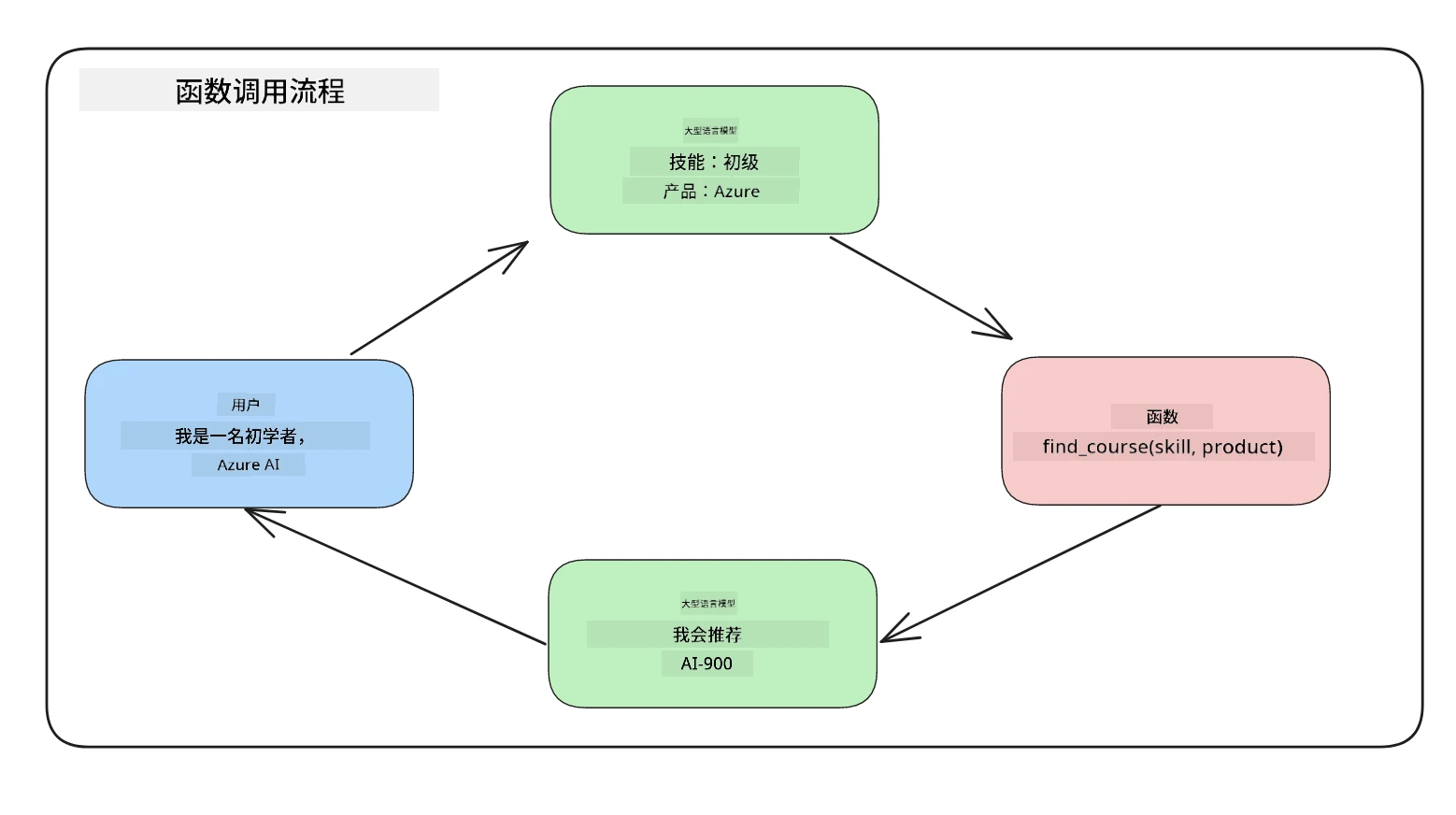
然后我们可以将函数返回的内容发送回 LLM,LLM 会使用自然语言回答用户的问题。
函数调用的使用场景
有许多场景中函数调用可以提升你的应用,比如:
-
调用外部工具。聊天机器人用来回答用户问题很出色。通过函数调用,聊天机器人可以利用用户消息完成某些任务。例如,学生可以让聊天机器人“给我的老师发封邮件,说我需要关于这门课的更多帮助”。这会调用函数
send_email(to: string, body: string)。 -
创建 API 或数据库查询。用户可以使用自然语言查找信息,转换成格式化查询或 API 请求。例如,教师请求“谁完成了最后一次作业?”时,可以调用函数
get_completed(student_name: string, assignment: int, current_status: string)。 -
生成结构化数据。用户可以提交一段文本或 CSV,使用 LLM 提取重要信息。例如,学生可以将关于和平协议的维基百科文章转换为 AI 闪卡。此操作可通过函数
get_important_facts(agreement_name: string, date_signed: string, parties_involved: list)实现。
创建第一个函数调用
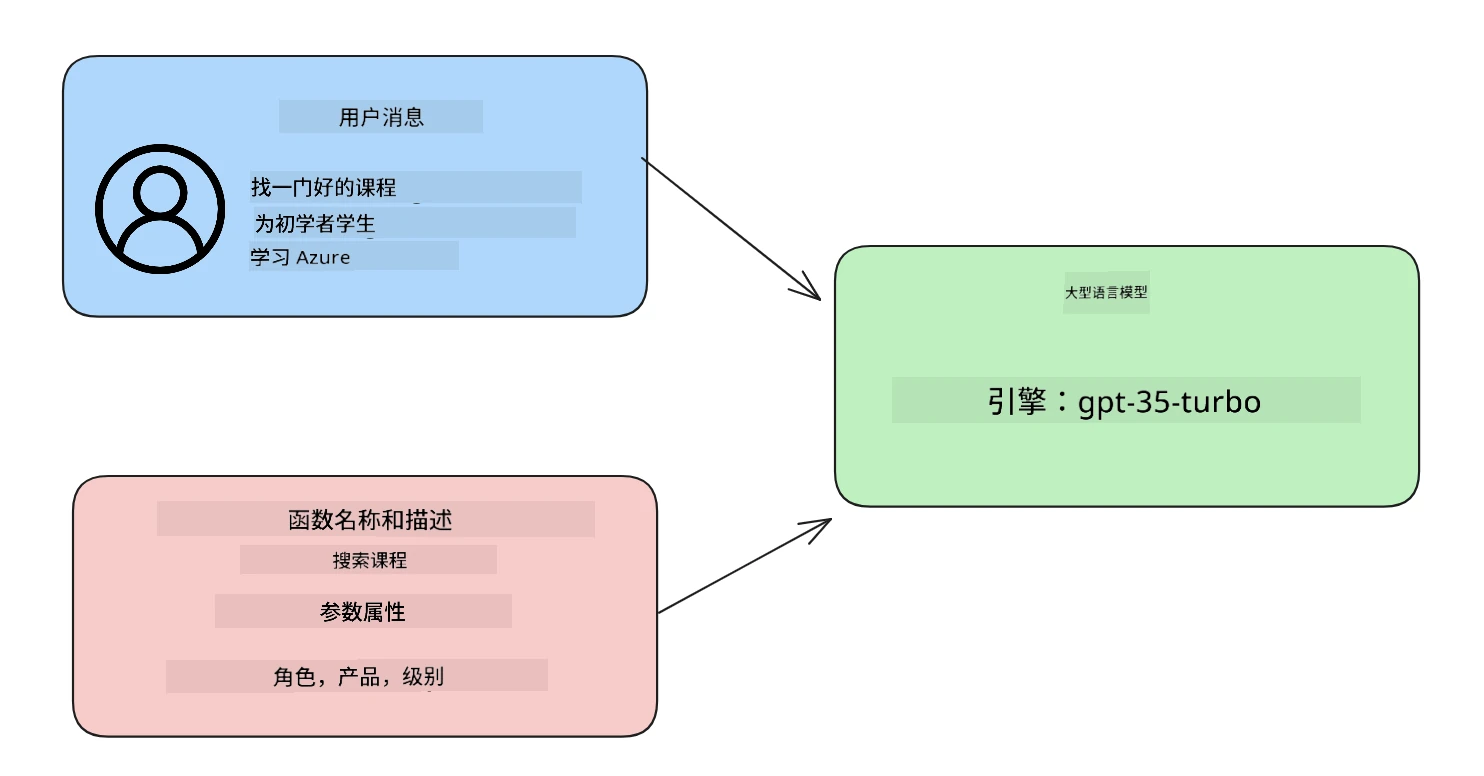
创建函数调用的过程包括三个主要步骤:
- 使用函数(工具)列表和用户消息调用响应 API。
- 读取模型的响应以执行某个操作,例如调用函数或 API。
- 使用函数响应再次调用响应 API,利用这些信息生成对用户的回复。
第一步 - 创建消息
第一步是创建一个用户消息。该值可以动态赋值,例如取自文本输入,也可以直接赋值。如果是首次使用响应 API,需要定义消息的 role 和 content。
role 可以是 system(创建规则),assistant(模型)或 user(终端用户)。在函数调用中,我们将此设置为 user 并给出示例问题。
messages= [ {"role": "user", "content": "Find me a good course for a beginner student to learn Azure."} ]
通过分配不同角色,LLM 会清楚是系统说话还是用户说话,从而建立可供 LLM 构建的对话历史。
第二步 - 创建函数
接下来,我们定义一个函数及其参数。这里仅用一个名为 search_courses 的函数,你也可以创建多个函数。
重要:函数包含在发送给 LLM 的系统消息中,会占用可用的 token 数量。
下方以数组形式创建函数。每个元素是响应 API 中的工具,具有属性 type、name、description 和 parameters:
functions = [
   {
      "type":"function",
      "name":"search_courses",
      "description":"Retrieves courses from the search index based on the parameters provided",
      "parameters":{
         "type":"object",
         "properties":{
            "role":{
               "type":"string",
               "description":"The role of the learner (i.e. developer, data scientist, student, etc.)"
            },
            "product":{
               "type":"string",
               "description":"The product that the lesson is covering (i.e. Azure, Power BI, etc.)"
            },
            "level":{
               "type":"string",
               "description":"The level of experience the learner has prior to taking the course (i.e. beginner, intermediate, advanced)"
            }
         },
         "required":[
            "role"
         ]
      }
   }
]
下面详细描述函数实例的各个部分:
name- 函数名称。description- 函数功能说明,需具体清晰。parameters- 希望模型在响应中产生的值和格式。参数数组包含以下属性:type- 属性存储的数据类型。properties- 模型将在响应中使用的具体值列表。name- 属性键名,例如product。type- 该属性的数据类型,例如string。description- 属性说明。
此外,还有一个可选属性 required - 函数调用必需的属性。
第三步 - 进行函数调用
定义函数后,需要在调用响应 API 时包含它。可通过将 tools 设置为 functions 实现。
还有一个选项是将 tool_choice 设置为 auto,即由 LLM 根据用户消息决定调用哪个函数,而非手动分配。
下面是调用 client.responses.create 的代码示例,注意设置了 tools=functions 和 tool_choice="auto",让 LLM 自行决定调用函数时机:
response = client.responses.create(model=deployment,
                                        input=messages,
                                        tools=functions,
                                        tool_choice="auto",
                                        store=False)

print(response.output)
现在返回的响应中,在 response.output 中包含了一个 function_call 项,看起来如下:
{
  "type": "function_call",
  "name": "search_courses",
  "call_id": "call_abc123",
  "arguments": "{\n  \"role\": \"student\",\n  \"product\": \"Azure\",\n  \"level\": \"beginner\"\n}"
}
在这里我们可以看到函数 search_courses 被调用了,带的参数在 JSON 响应的 arguments 属性中列出。
LLM 能提取数据填充函数参数,是因为它从传入响应 API 的 input 参数的值中抽取相应信息。下面是 messages 的提醒:
messages= [ {"role": "user", "content": "Find me a good course for a beginner student to learn Azure."} ]
如你所见,student、Azure 和 beginner 从 messages 中提取并设置为函数输入。通过函数调用提取信息是一种很棒的方式,同时也给 LLM 提供了结构化和可重用功能。
接下来,我们看看如何在应用程序中使用它。
将函数调用集成到应用中
在测试了 LLM 返回的结构化响应后,我们现在可以将其集成到应用中。
流程管理
集成到应用中,我们采取以下步骤:
-
首先,调用 OpenAI 服务,从响应
output中提取函数调用项。PYTHONresponse_items = response.output tool_calls = [item for item in response_items if item.type == "function_call"] -
现在定义调用 Microsoft Learn API 以获取课程列表的函数:
PYTHONimport requests def search_courses(role, product, level): url = "https://learn.microsoft.com/api/catalog/" params = { "role": role, "product": product, "level": level } response = requests.get(url, params=params) modules = response.json()["modules"] results = [] for module in modules[:5]: title = module["title"] url = module["url"] results.append({"title": title, "url": url}) return str(results)注意我们现在创建了实际的 Python 函数,对应
functions变量中的函数名称。我们实际上调用外部 API 拉取数据,这里是对 Microsoft Learn API 搜索培训模块。
好的,创建了 functions 变量和对应的 Python 函数,我们如何告诉 LLM 将二者映射,使我们的 Python 函数被调用?
-
判断是否调用 Python 函数,需要查看 LLM 响应中是否包含
function_call条目,并调用相应函数。下面是检查代码示例:PYTHON# 检查模型是否想调用一个函数 if tool_calls: for tool_call in tool_calls: print("Recommended Function call:") print(tool_call.name) print() # 调用该函数。 function_name = tool_call.name available_functions = { "search_courses": search_courses, } function_to_call = available_functions[function_name] function_args = json.loads(tool_call.arguments) function_response = function_to_call(**function_args) print("Output of function call:") print(function_response) print(type(function_response)) # 将函数调用及其结果添加回对话中。 # 模型的 function_call 项必须附加在其输出之前。 messages.append(tool_call) # 助手的 function_call 项 messages.append( # 函数结果 { "type": "function_call_output", "call_id": tool_call.call_id, "output": function_response, } )这三行代码能确保提取函数名、参数并执行调用:
PYTHONfunction_to_call = available_functions[function_name] function_args = json.loads(tool_call.arguments) function_response = function_to_call(**function_args)以下是运行以上代码的输出:
输出
RECOMMENDED{ "name": "search_courses", "arguments": "{\n \"role\": \"student\",\n \"product\": \"Azure\",\n \"level\": \"beginner\"\n}" } Output of function call: [{'title': 'Describe concepts of cryptography', 'url': 'https://learn.microsoft.com/training/modules/describe-concepts-of-cryptography/? WT.mc_id=api_CatalogApi'}, {'title': 'Introduction to audio classification with TensorFlow', 'url': 'https://learn.microsoft.com/en- us/training/modules/intro-audio-classification-tensorflow/?WT.mc_id=api_CatalogApi'}, {'title': 'Design a Performant Data Model in Azure SQL Database with Azure Data Studio', 'url': 'https://learn.microsoft.com/training/modules/design-a-data-model-with-ads/? WT.mc_id=api_CatalogApi'}, {'title': 'Getting started with the Microsoft Cloud Adoption Framework for Azure', 'url': 'https://learn.microsoft.com/training/modules/cloud-adoption-framework-getting-started/?WT.mc_id=api_CatalogApi'}, {'title': 'Set up the Rust development environment', 'url': 'https://learn.microsoft.com/training/modules/rust-set-up-environment/?WT.mc_id=api_CatalogApi'}] <class 'str'> -
现在我们将更新后的消息
messages发送到 LLM,以获得自然语言响应,而非 API JSON 格式响应。PYTHONprint("Messages in next request:") print(messages) print() second_response = client.responses.create( input=messages, model=deployment, tool_choice="auto", tools=functions, temperature=0, store=False, ) # 从模型获取一个新的响应,其中它可以看到函数的响应 print(second_response.output_text)输出
TEXTI found some good courses for beginner students to learn Azure: 1. [Describe concepts of cryptography](https://learn.microsoft.com/training/modules/describe-concepts-of-cryptography/?WT.mc_id=api_CatalogApi) 2. [Introduction to audio classification with TensorFlow](https://learn.microsoft.com/training/modules/intro-audio-classification-tensorflow/?WT.mc_id=api_CatalogApi) 3. [Design a Performant Data Model in Azure SQL Database with Azure Data Studio](https://learn.microsoft.com/training/modules/design-a-data-model-with-ads/?WT.mc_id=api_CatalogApi) 4. [Getting started with the Microsoft Cloud Adoption Framework for Azure](https://learn.microsoft.com/training/modules/cloud-adoption-framework-getting-started/?WT.mc_id=api_CatalogApi) 5. [Set up the Rust development environment](https://learn.microsoft.com/training/modules/rust-set-up-environment/?WT.mc_id=api_CatalogApi) You can click on the links to access the courses.
作业
如需继续学习 Azure OpenAI 函数调用,可以构建:
-
更多功能参数,帮助学习者发现更多课程。
-
创建另一个函数调用,从学习者那里获取更多信息,比如他们的母语
-
在函数调用和/或 API 调用未返回任何合适课程时,创建错误处理
提示:请参阅 Learn API 参考文档 页面,了解这些数据如何以及在哪里可用。
干得好!继续前行
完成本课后,查看我们的 生成式 AI 学习集合,继续提升您的生成式 AI 知识!
前往第12课,我们将学习如何为 AI 应用设计 用户体验!
免责声明: 本文件由 AI 翻译服务 Co-op Translator 翻译完成。尽管我们力求准确,但请注意,自动翻译可能包含错误或不准确之处。原始语言版文件应视为权威来源。对于重要信息,建议使用专业人工翻译。我们对因使用本翻译而产生的任何误解或误释不承担责任。
MIT License
MIT License

Copyright (c) Microsoft Corporation.

Permission is hereby granted, free of charge, to any person obtaining a copy
of this software and associated documentation files (the "Software"), to deal
in the Software without restriction, including without limitation the rights
to use, copy, modify, merge, publish, distribute, sublicense, and/or sell
copies of the Software, and to permit persons to whom the Software is
furnished to do so, subject to the following conditions:

The above copyright notice and this permission notice shall be included in all
copies or substantial portions of the Software.

THE SOFTWARE IS PROVIDED "AS IS", WITHOUT WARRANTY OF ANY KIND, EXPRESS OR
IMPLIED, INCLUDING BUT NOT LIMITED TO THE WARRANTIES OF MERCHANTABILITY,
FITNESS FOR A PARTICULAR PURPOSE AND NONINFRINGEMENT. IN NO EVENT SHALL THE
AUTHORS OR COPYRIGHT HOLDERS BE LIABLE FOR ANY CLAIM, DAMAGES OR OTHER
LIABILITY, WHETHER IN AN ACTION OF CONTRACT, TORT OR OTHERWISE, ARISING FROM,
OUT OF OR IN CONNECTION WITH THE SOFTWARE OR THE USE OR OTHER DEALINGS IN THE
SOFTWARE.